Loan Account Delinquency Details
| Screen ID: | n/a | 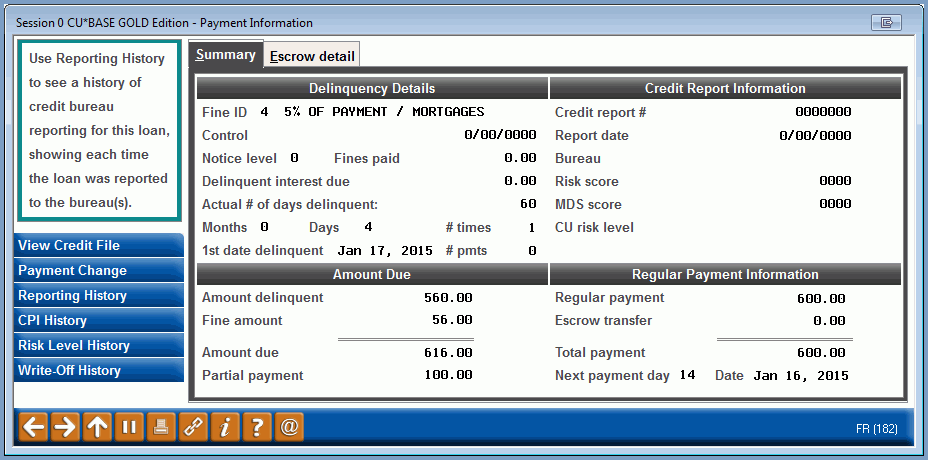
|
| Screen Title: | Delinquency | |
| Panel ID: | 182 | |
| Tool Number: | n/a | |
| Click here to magnify |
This window will appear when using the lookup next to Delinquent in the upper right corner of the Account Detail screen for a loan or line of credit account. It can also be configured to appear automatically when viewing details on a loan or LOC if the account is currently delinquent.(Online CUs, contact a client service representative about changing this setting. Self Processors, this can be changed in Tool #1005 Workflow Controls: Teller/Member Service.

|
Check out the video related to this topic: Collection Card II (More videos below!) |
Helpful Resources
Payment Change History and Delinquency Calculations
Why am I seeing all 9s in fields on this screen? What are the affected tables?
Screen Overview
This window displays details about this loan's delinquency status, as well as information about the online credit report that was used when creating this loan, if any. You can also use the Reporting History (F10) feature to see a history of credit bureau reporting for this loan, showing each time the loan was reported to the bureau(s) and the associated status information.
When done viewing this information, use the Backup arrow to return to the loan account detail screen.
Viewing Credit Report Information
If a credit report is linked to an account, that credit report detail will automatically be stored in CU*Spy for the entire life of the loan account on the system in you are an online CU*Answers CU*BASE credit union. (self-processors and credit unions from CU*NorthWest/CU*South retain credit reports according to their individual practices.) Use View Credit File (F1) to jump to CU*Spy and look at the archived copy of the report used to approve this loan.
-
Credit reports are linked to loan accounts using Miscellaneous Loan Maintenance. Access to credit reports via this key is controlled by CU*BASE Employee Security and then Update Special Security)
Viewing Risk Level History
Use Risk Level History (F13) to access a history of all changes made to the Paper Grade/Risk Level on this loan.
Special Note Regarding Online Credit Cards
If viewing this window for a CU*BASE online credit card loan account, use History (F5) to display a screen showing credit card statement history for this loan, including a record of the balance and minimum payments calculated for each statement billing cycle.
Use Payment Change (F9) to access the History of Payment Changes screen where you can view a history of payment changes made to this loan.
Use Catch-up Calc (F11) to access the Payment Catch Up Calculator feature, to help a member figure out what payment needs to be made to catch up a delinquent credit card account. Refer to the Online Credit Card Processing User Guide for more details.
Viewing CPI HIstory Force Place Insurance
Use CPI History (F12) to view the history of CPI force-placed insurance (for credit unions who use the "posting and payment adjustment" method only).
-
NOTE: This button will show even if there is no force-placed insurance.
Viewing Written-Off Loan Information
Use Write-Off History (F14) to view information on the status of the loan when it was written off.
-
NOTE: This button will appear even if the loan is not written off. If the subsequent screen has all zeros, this loan was not written off.
Field Descriptions
|
Field Name |
Description |
|
Summary Tab |
|
|
Fine ID |
A code showing the type of fine for this loan. |
|
Control (flag) |
This flag shows the delinquency type code assigned to this loan account. This code controls how the next payment date is advanced on the loan. P Single payment per period - The next payment date will not advance more than one payment period. Loans cannot be paid ahead. This method is typically used on open credit loans.
(blank) Can pay ahead - The next payment date is advanced according to the number of payments made.
N No delinquency calc - The system neither monitors nor controls the next payment date or delinquency on the loan. However, payments can be applied to the loan. 1 = Can Pay One Period Ahead, etc. – For mortgages with the 360-day calculation type, these options let you allow the member to pay ahead, but limit the number of months (up to 9 max.). Only allowed on loans with interest calc type 3 = 360/Post. |
|
Control (date) |
This shows a previous payment date assigned to the member, following the rules outlined in this section. This may not be the last time a payment was due. (See explanation below.)
Remember, this is the payment date for which this fine applies, not the date on which the fine was actually assessed by the system. For example, if the fine is configured so that it is assessed after the member has been delinquent 15 days, then the fine would actually be assessed after that period was ended. This field, however, would show the original payment due date for which the fine was assessed. This field makes it easy to communicate to the member that they are being fined for missing their November payment, or their March payment, or their third quarter payment, etc. |
|
Notice level |
This field shows the last delinquency notice that was sent to this member. (There are four levels; this number corresponds to the notice level that was sent.) NOTE: Notice Level “5” indicates that this loan has been moved to the Non-Responsive Delinquent Loan Report. |
|
Fines paid |
The total amount of fines paid year-to-date. |
|
Delinquent interest due |
(Used by mortgage loans with the 360 calculation type only.) Because of the unique way that mortgage loans are handled by CU*BASE, this field is used to retain the amount of interest due for one delinquent payment so that the system can remember how much interest was due from last month separate from how much is due in total. Because of this, CU*BASE can automatically handle the payment spread (escrow, interest, principal, etc.) on delinquent payments for loans that are no more than 2 payments past due. For more details, refer to the CU*BASE Mortgage Products: 360-Day Interest Calculation booklet. |
|
Actual # of days delinquent |
This field shows the actual number of days the loan is delinquent calculated by comparing the payment due date to the current processing date. This calculation considers months with 28 days and 31 days. |
|
Months # times |
The total number of months and days the loan is behind. This is calculated using the date shown in the Next payment field in relation to the current date. The # times is the number of times the loan has gone delinquent over the life of the loan. This is incremented by 1 each time the member is delinquent 30 days. |
|
1st date delinquent |
The date on which this loan was first monitored as being delinquent for the current cycle. |
|
Amount delinquent |
The total amount that is past due, less any partial payment amount already collected, calculated as follows: Regular payment ´Months - Part Pay = Amt Delq
|
|
Fine amount |
The total outstanding fine due. The amount of the fine is calculated using the parameters set in the delinquency fine code (Fine ID).
|
|
Amount due |
This field shows the total amount the member owes in order to bring the loan current and satisfy any outstanding fines: Amt Delq + Fine Amt = Amt Due
|
|
Partial payment |
This field is used to record any amount that has been deposited toward a regular payment, but which was not enough to satisfy the entire payment amount. This amount is used when determining the total past due amount, as shown under Amount Delinquent above. |
|
Credit report # |
The online credit report number associated with this loan, if any.
|
|
Report date |
The date on the online credit report number associated with this loan, if any. |
|
Bureau |
The credit bureau for the online credit report associated with this loan, if any. |
|
Risk score |
The credit score (FICO, BEACON, EMPIRICA) from the online credit report associated with this loan, if any. |
|
MDS score |
The MDS/bankruptcy score from the online credit report associated with this loan, if any. |
|
CU risk level |
The credit union-defined risk level or “paper grade” determined for this member when the loan was created.
|
|
Regular payment |
The regular scheduled payment amount, not including any escrow amount. |
|
Escrow transfer |
If this loan is set up to transfer funds to an associated tax escrow account, this shows the amount to be transferred for each payment.
|
|
Total payment |
The total regular scheduled payment amount, including any escrow transfer amount. |
|
Next payment (day) |
The day of the month on which the next payment is due. This is used primarily for situations where the normal payment due date falls near the end of the month (29th, 30th, 31st), to adjust for months with different numbers of days. |
|
Date |
The date on which the next payment is due. |
|
Escrow Detail Tab |
|
|
Loan partial payment |
The partial pay that has been paid toward the loan payment |
|
Escrow partial payment |
The partial pay that has been paid toward the escrow payment |
|
Total partial payment |
The total of the loan partial payment and escrow partial payment fields (above) |
|
Escrow remaining |
The amount left to be paid on the escrow |
|
Escrow run date |
The date that the escrow analysis was last run (month and year) |
|
Escrow analysis date |
The exact date that the escrow analysis was last run (MMDDYYYY) |
Additional Video Resources
|
|
Check out these additional video resources! |
Visit the CU*BASE video library.